Keep Your Kitchen Moving With Every Order in View.
A real-time kitchen display system that organizes incoming orders, keeps preparation teams aligned, tracks order progress, and helps your restaurant move from order received to ready without unnecessary delays.
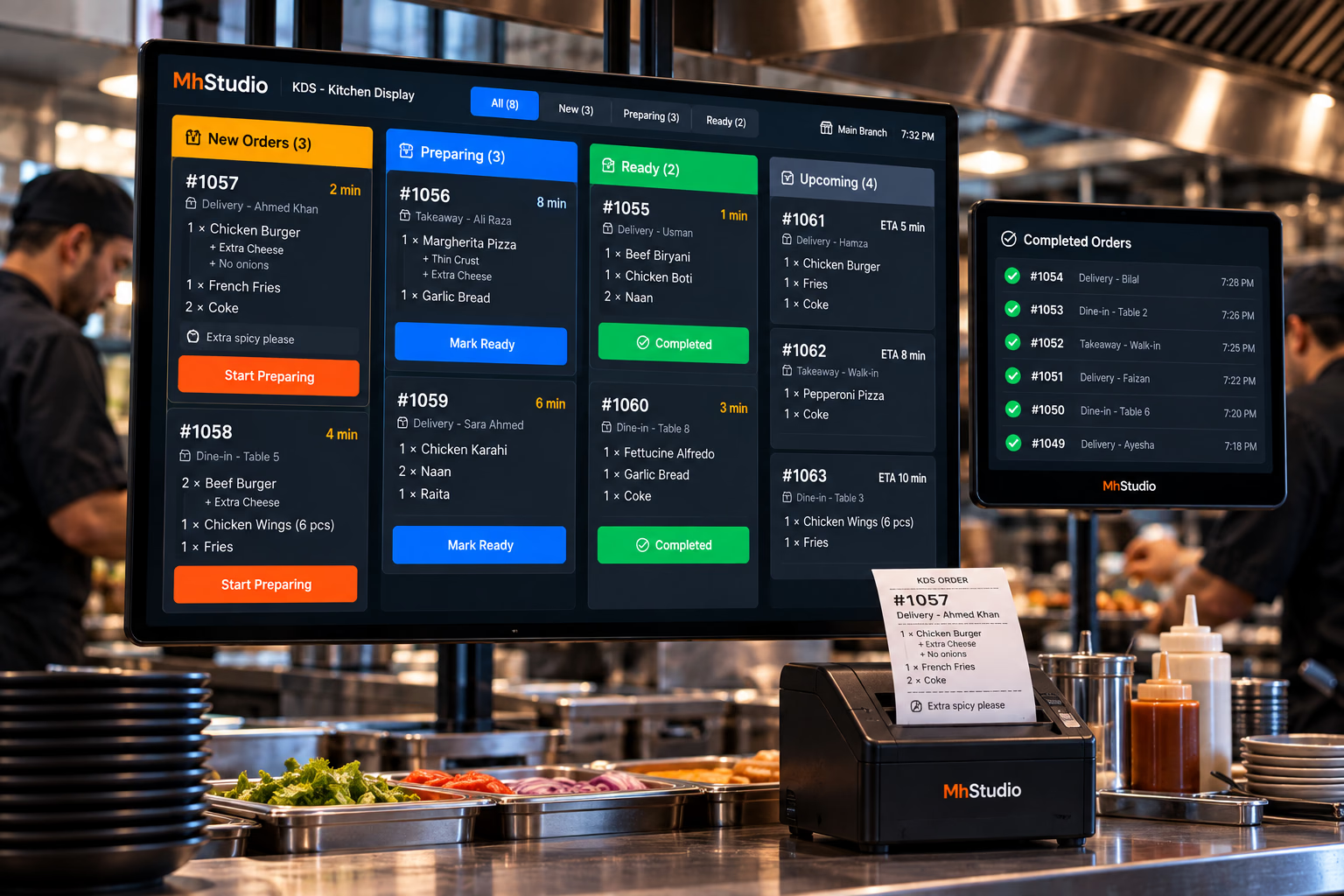
From Every Order to Every Plate — One Clear Kitchen Workflow.
Restaurant kitchens move quickly. Orders arrive from dine-in, takeaway, delivery, online ordering, QR menus, and other channels. Kitchen staff need to know what came in, what is being prepared, what needs attention, and what is ready to leave the kitchen.
See
Give kitchen staff a clear view of incoming orders.
Prepare
Move tickets through a structured preparation workflow.
Complete
Mark orders ready so the next part of the restaurant operation can take over.
Paper Tickets and Verbal Instructions Get Lost.
When a restaurant gets busy, kitchen teams may have to manage multiple orders simultaneously while dealing with modifications, special instructions, timing requirements, and different fulfillment types.
Lost Tickets
Paper tickets can be misplaced, damaged, or difficult to prioritize.
Unclear Priorities
Staff need to know what requires attention first when many orders arrive.
Modification Errors
Special instructions need to be visible to the right kitchen staff.
Limited Visibility
Managers need to know how many orders are waiting, preparing, or ready.
Every Order Can Arrive in the Same Kitchen Workflow.
The kitchen shouldn't have to care where an order originated. Whether the customer ordered through the website, mobile app, POS, QR menu, or another channel, the kitchen needs one clear preparation queue.
Help Your Team Know What Needs Attention First.
Kitchen workflows can use order time, order type, scheduled pickup times, or configured priority rules to help staff organize their queue.
No Guesswork. No Missing Instructions.
Kitchen tickets should contain the information needed to prepare the order correctly without forcing staff to search through another system.
Route the Right Work to the Right Team.
Larger restaurants may have multiple preparation areas. A KDS can be structured around kitchen stations so teams see the work relevant to their responsibilities, even if it's from the same order.
Keep Orders Moving Through Every Handoff.
KDS keeps the connection between the order, the kitchen, and the service team, regardless of how the order is fulfilled.
Dine-In
Takeaway
Delivery
More Than a Digital Screen.
MhStudio KDS is a real-time digital workflow for organizing and managing restaurant kitchen preparation. It connects seamlessly with your POS and RMS to keep the entire restaurant in sync.