Manage Every Table, Order, and Guest From One Place.
A connected dine-in management system for table layouts, table status, waiter orders, open checks, QR self-ordering, kitchen coordination, billing, and guest service.
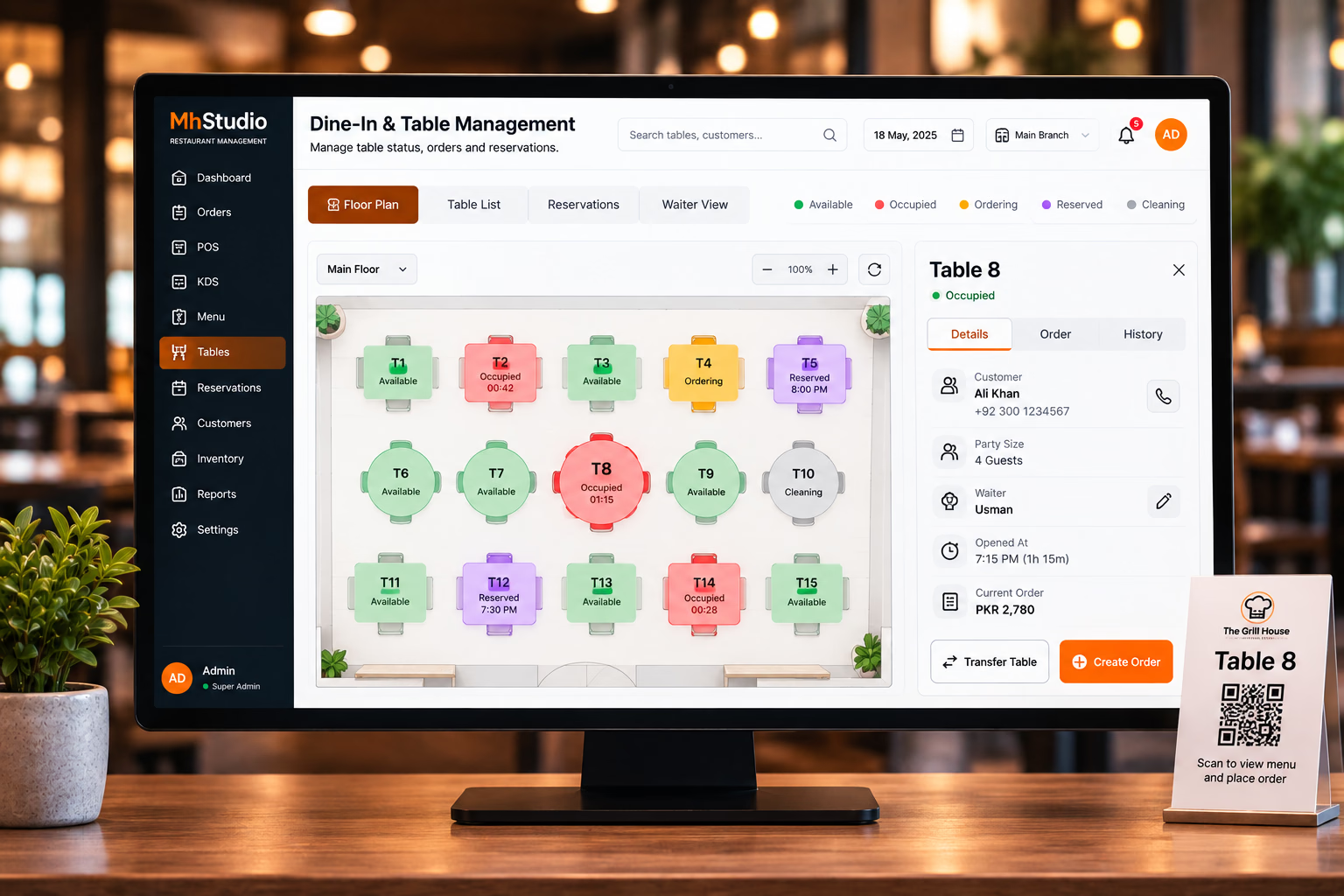
From the Moment Guests Sit Down to the Moment They Leave.
Dine-in service involves more than taking an order. Staff need to know which tables are occupied, who is serving them, what is being prepared, and when the bill is ready. MhStudio connects these steps into one dine-in workflow.
Manage
Know the status of every table at a glance.
Serve
Create and manage orders throughout the guest's visit.
Close
Handle bills and payments, then return the table to available.
When Systems Aren't Connected, Service Gets Harder.
During busy periods, staff manage multiple tables, open orders, new guests, and kitchen requests simultaneously. Without a centralized workflow, it becomes difficult to know what is happening where.
Lost Table Context
Staff need to know which order belongs to which table.
Open Orders
Customers often add items throughout their visit.
Slow Communication
Changes need to reach the kitchen and service team instantly.
Payment Delays
Closing bills gets complicated with multiple guests.
Whether Guests Order With a Waiter or Their Phone, Everything Reaches the Same Workflow.
Dine-in ordering can support both staff-assisted service and customer self-ordering via table QR codes. Both methods converge into the exact same kitchen workflow.
Everything Staff Need to Know About an Active Table.
Selecting a table opens a clear overview of the current service state, assigned waiter, and current order value.
Keep the Table's Order Open Throughout the Visit.
Guests order more than once. Staff can add items to an existing table order without creating unnecessary duplicate transactions.
Send Every Table Order to the Kitchen With Context.
The kitchen needs to know not only what to prepare, but exactly which table the order belongs to. The table number stays attached to the order everywhere.
1 × Pizza
Everything Your Dine-In Team Needs.
A complete workspace for managing table service smoothly.
Floor Plan
Visual restaurant table layout and status.
Table Status
Track occupied, payment, cleaning and more states.
Waiter Orders
Create and manage orders directly from POS.
QR Ordering
Table-specific customer self-ordering via phone.
Open Checks
Keep orders open throughout the customer's visit.
Additional Orders
Add items without creating duplicate orders.
KDS Integration
Send table orders directly to the kitchen.
Reservations
Connect bookings with table availability mapping.
Split Bills
Handle multiple guests and split payments.
Table Transfer
Move active orders between tables easily.
Table Merge
Combine tables to support larger groups.
Performance
Track table turnover and waiter efficiency.
Give Your Team a Better Way to Manage Every Table.
Connect your floor plan, tables, waiters, QR ordering, kitchen, billing, and guest experience through one modern dine-in management system.